

There are many Samsung phone users, and to keep your phone contacts safer you would want to move them to your computer, but we can't do that just via a USB cable, we need an android file manager to help. I found Coolmuster Android Backup Assistant really helpful.Â
Samsung contacts backup, follow this:
Step 1: Connect Samsung Phone to PC and Run the Problem
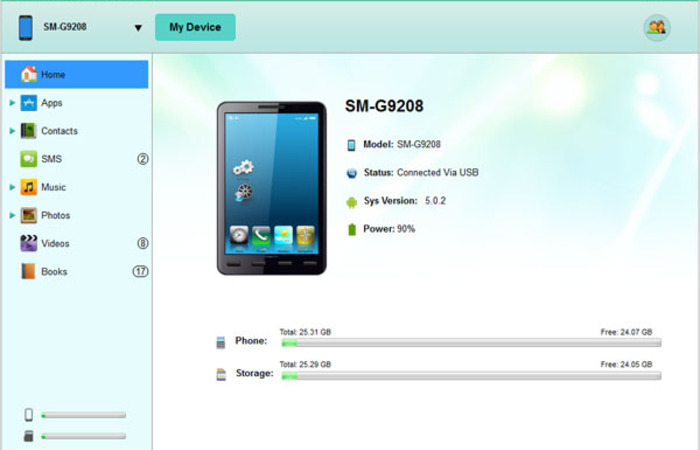
Connect your samsung phone to computer via USB cable, then start the Coolmuster Android Assistant. The problem will detect your samsung phone automatically and you'll see some detailed info of your samsung phone in an interface.
Tips: If this is the first time your samsung phone connecting with the problem, you'll need to enable USB debugging first. You just need to follow the guide to open the USB debugging and install USB driver on your cell phone. Once the USB debugging finished, you'll see an interface just like above.
For Android 2.3 or older, Go: "Settings" < Click "Applications" < Click "Development" < Check "USB debugging".
For Android 3.0 to 4.1: Enter "Settings" < Click "Developer options" < Check "USB debugging".

For Android 4.2 or newer: Enter "Settings" < Click "About Phone" < Tap "Build number" for several times until getting a note "You are under developer mode" < Back to "Settings" < Click "Developer options" < Check "USB debugging"
Step 2: Select and Check Contacts and Start Export
Now you can click "Contacts" on the top to view all of your samsung phone contacts, select and check those you want to backup, and just click "Backup" to start the export.
OK! That's all! We can use Coolmuster Android Assistant to move almost everything  from android phone to computer, and we can also use it to manage apps,  contacts on computer, have a try!
A wide range of Android brands  are supported by this Android managing tool, including HTC, Samsung,  Motorola, Sony, ZTE, LG, HUAWEI, Dell and many more.
https://www.youtube.com/watch?v=EZlYjWFBfU0
Â
You can recover lost Samsung galaxy data from the backup file, and if you don’t make a backup before, you can still use Coolmuster Lab.Fone for Android to help, it could recover lost data from your android phone on computer easily.
Â
It’s also very easy to use, if you need to recover lost text messages and contacts, you’ll need to root your android phones first, otherwise this problem won't detect and scan your device. And recover other kinds of files don’t need to root.





Comments (0)
No comments yet. Be the first to comment.